How to Build a Pricing Comparison Table for Competing Products
Updated Nov 15, 2026
You need to know what your competitors charge. That means one clean table with every rival's plans, prices and limits side by side, not 12 open tabs and a messy doc. To build a pricing comparison table, pick 3 to 5 competitors and set the same columns for each one: plan names, starting price, billing basis, free tier or trial, key limits, who it's for and a link to the pricing page. Then convert every price to the same terms so the numbers really compare. In Autofill, you type one sentence like "Competitors of our invoicing app, with pricing pages." Autofill proposes those columns and researches each competitor on the web to fill the rows.
Most results for this search show how to design a pricing table for your own website. This guide is about the other job: researching what competing products charge and laying it out so you can make a decision.
What goes in a competitor pricing comparison table
Nielsen Norman Group defines a comparison table as one that puts products in columns and attributes in rows. In a working spreadsheet it's usually flipped: one row per competitor and one column per fact, so the list can grow. Either way, the columns decide whether the table is useful. Here's a set that works for most software and service products:
- Product: the competitor's name.
- Plans: the tier names, from lowest to highest.
- Starting price: the cheapest paid plan.
- Billing basis: per seat, flat, or usage-based.
- Billing period: whether the shown price needs a yearly commitment.
- Free tier or trial: yes or no, and the limit.
- Key limit: the thing that pushes people to upgrade (seats, invoices, contacts, storage).
- Who it's for: freelancers, small teams, enterprise.
- What reviewers dislike: the complaint that keeps coming up.
- Pricing page: the link, so anyone can check the number.
- Date checked: prices change, so record when you looked.
Make the prices actually comparable
This is where most hand-built tables go wrong. A price of "$8" on one site and "$12" on another may not be the same kind of number. UX Tigers' guide to comparison tables warns against putting a per-user price billed yearly next to a monthly one, because the lower number can hide a 12-month commitment. Its advice is to convert every price to a monthly figure on the same terms, and to pick a per-unit measure (per seat, per page, per terabyte) that matches the decision you're making.
So before you compare, decide on:
- One currency.
- One billing period. Monthly is easiest to read.
- One unit. For example, the price for a 5-person team, or the price per 100 invoices.
Add a column for that normalized number, next to the raw price. The raw price shows what the page says. The normalized price is the number you compare.
Keep it short enough to read
You can research 20 competitors, but don't try to compare all 20 at once. NN/g says static comparison tables work best for small selections of under 5 items. UX Tigers suggests starting with no more than 5 product columns on desktop. A good approach is to build the full list first, then sort or filter it down to the 3 to 5 rivals your buyers actually weigh you against.
Step by step: build it in Autofill
Here's the same table built in Autofill, using the example of a small invoicing app.
1. Describe the table. On the Sheets page, start a new sheet and type the list you need in a sentence: "Competitors of our invoicing app, with pricing pages." Press Build sheet. While it works you'll see "Proposing columns."
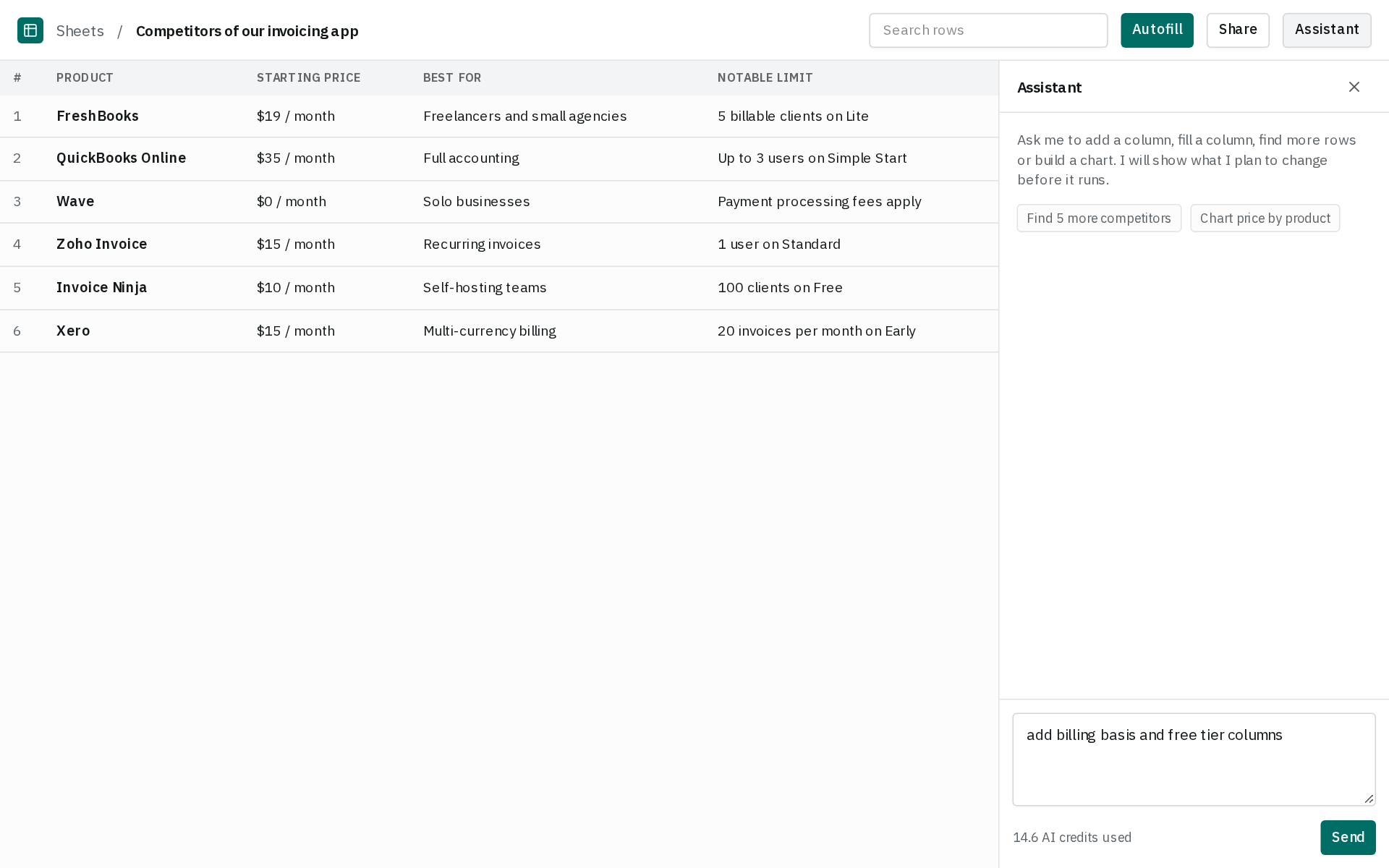
2. Check the columns. Autofill proposes columns such as product, price, plans, who it's for, what reviewers dislike and pricing page. Use the assistant panel on the right to ask for changes, such as "add billing basis and free tier columns" or "add a column for price for a 5-person team, monthly."
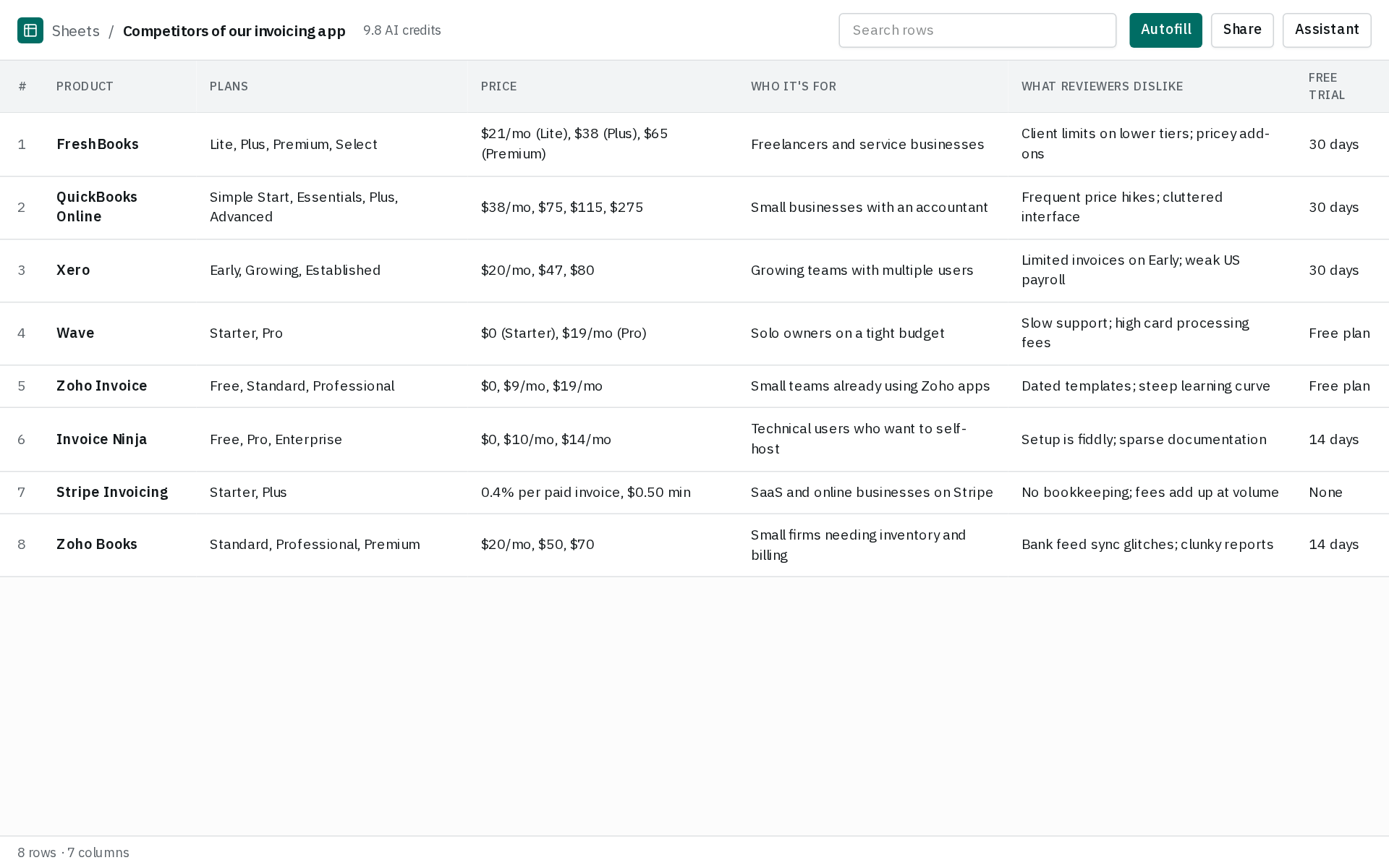
3. Let it find the rows. If you don't have a competitor list yet, choose Parallel when you create the sheet so Autofill finds the rows themselves, not just the facts. Use the "Autofill first … rows" picker to set how many rows to find. Ten or 25 is plenty for a competitor scan.
4. Watch it fill. Autofill researches each competitor on the web and fills in answers as it finds them. If a run is going the wrong way (say it's pulling enterprise quotes you don't care about), use the Stop button in the progress strip.
5. Check what matters. Prices are the facts you'll quote in a sales call or a board deck, so check them before you rely on them. Keep the pricing page column and click through on any number that looks off. To flag a cell, leave a comment in the assistant panel and press Ask @autofill so it rechecks or fixes that cell, row or column.
6. Put it to work. Turn the filled sheet into a chart or a written report, share it with a read-only link, or download it as CSV or Excel to drop into your deck or your own spreadsheet. Developers can also read the sheet through the REST API or the MCP server (see Developers).
7. Keep it current. Pricing pages change without notice, and a table from last quarter can mislead you. Set the sheet to auto-refresh so new rows come in on their own instead of starting over.
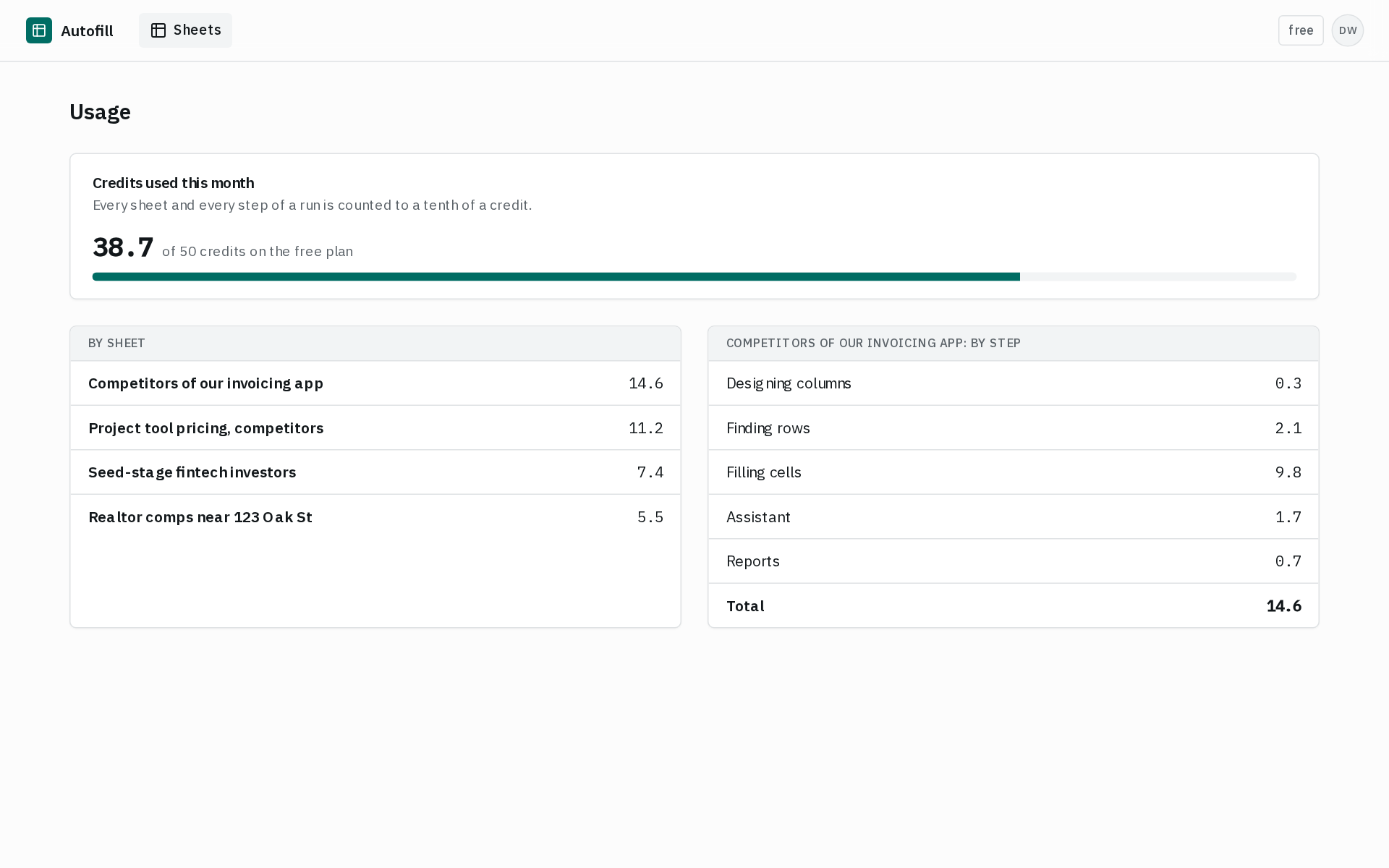
Want to see what a run cost? The Usage page breaks down credits by sheet and by step. Your balance shows to a tenth of a credit.
For more on the prompt-to-table part, see AI Table Generator from a Prompt. If your product team does this often, competitor scans and feature tables shows more examples.
Why not just use a free template?
Free templates are a fine starting point. Spreadsheet Daddy's competitor price analysis template (as of November 2026) has columns for product, competitor, competitor price and your price, and it works out the price difference for you. If you're comparing 3 known competitors once, a template and an hour of copy-paste will do the job.
The template doesn't do the research, though. You still open every pricing page, work out the billing terms and type each number by hand. And you have to do it all again when prices change. Autofill is worth paying for once the list is longer than a handful, once you don't know every competitor yet, or once you need the table to stay current. Those are the cases where hand research takes hours.
When Autofill isn't the right tool
- You want to design a pricing table for your own website. Autofill researches and fills data sheets. It doesn't build the plan cards or checkmark grids on a pricing page. Use your site builder or a pricing-table plugin for that.
- You only need an alert when one page changes. A page monitor like Visualping (as of November 2026) is built to watch a competitor's pricing page and alert you. That's the better pick if you already know the exact pages and just want to hear when they change.
Questions
What is a comparison table?
A comparison table lays out two or more products, plans or services side by side, with their shared attributes as rows. NN/g defines it as products in columns and attributes in rows, so you can compare features and characteristics at a glance.
What is a pricing table?
A pricing table lists plans and what each one costs and includes. It's usually on a company's own pricing page. A pricing comparison table puts several companies' plans together so you can compare them, which is what this guide covers.
How do I create a pricing sheet?
Make one row per product or competitor and give each one the same columns: plans, starting price, billing basis, free tier, key limit and a source link. Then add a normalized price column so every number uses the same terms. In Autofill you describe the sheet in a sentence and it proposes the columns and fills the rows from the web.
What are the 5 C's of pricing?
One common version, from an open marketing textbook on LibreTexts, lists cost, customers, channels of distribution, competition and compatibility. A competitor pricing table covers the "competition" C. Other versions of the list use slightly different terms.
How often should I update a competitor pricing table?
Check it before any launch or pricing change of your own, and on a regular schedule in between. In Autofill you can set a sheet to auto-refresh instead of redoing the research by hand.
Can I get the table into Excel or Google Sheets?
Yes. Download any Autofill sheet as CSV or Excel and open it in either one.